

Introduction
In today’s digital world, most of the valuable information is not stored in neat tables or structured databases. Instead, it comes from messy but powerful sources like customer reviews, emails, social media posts, call center transcripts, and survey responses.
This type of unstructured text data is growing at a massive scale, and organizations are increasingly trying to turn it into actionable insights.
To handle this challenge, many data professionals rely on tools like SAS Enterprise Guide, a widely used platform for data analysis and reporting. It provides a user-friendly environment for working with complex datasets while supporting advanced analytical techniques, including text processing and mining capabilities.
In this article, you will learn how text data can be processed and analyzed using SAS Enterprise Guide, what techniques are involved in extracting meaningful patterns, and how businesses use these insights for better decision making. We will also explore practical applications, key features, and best practices to help you understand the complete workflow in a simple and structured way.
At its core, text analytics in sas enterprise guide helps organizations extract meaningful insights from unstructured data and transform raw text into valuable business intelligence.
What is Text Analytics in SAS Enterprise Guide
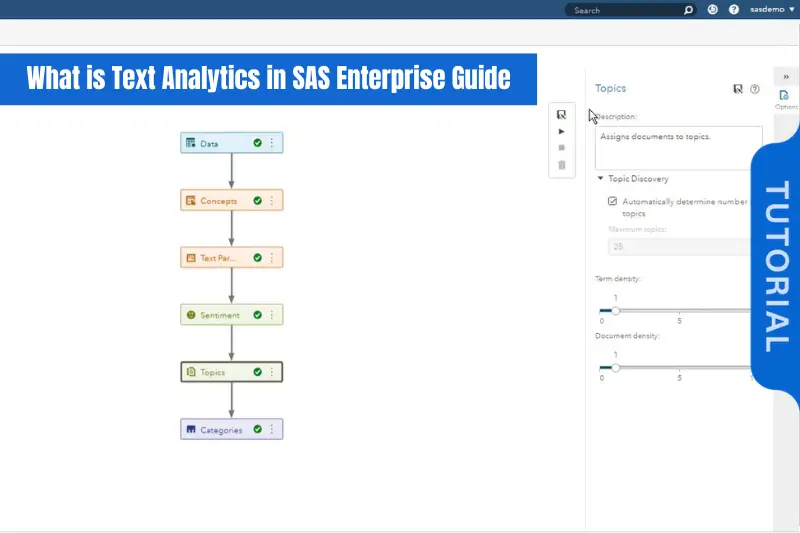
Text analytics refers to the process of transforming unstructured text data into meaningful and structured insights. It involves techniques that help identify patterns, trends, and relationships hidden inside large volumes of textual information.
SAS Enterprise Guide is a graphical user interface tool developed by SAS that simplifies data analysis and statistical modeling. When combined with text analytics capabilities, it allows users to process raw text data without needing deep programming knowledge.
In simple terms, text analytics in sas enterprise guide enables analysts to take raw text such as customer feedback or survey responses and convert it into useful information like themes, sentiment, and key topics.
This makes it easier for businesses to understand what people are saying, how they feel, and what actions should be taken based on that information.
Why Text Analytics Matters in Modern Data Analysis
The importance of text analytics has increased rapidly due to the explosion of digital communication. Every second, huge amounts of text are generated across platforms, and traditional structured data analysis alone is no longer enough.
Text analytics helps organizations unlock insights from this unstructured content, which often contains honest opinions, hidden problems, and valuable opportunities.
Some key reasons why it matters include:
- Businesses can understand customer sentiment in real time
- Large volumes of feedback can be analyzed automatically
- Decision making becomes more data driven
- Trends and patterns can be detected early
- It improves marketing and product strategy
Without tools like SAS Enterprise Guide, analyzing such large text datasets manually would be nearly impossible.
Key Features of Text Analytics in SAS Enterprise Guide
SAS Enterprise Guide provides several built-in features that make text analysis more efficient and structured:
Text Parsing
Breaks down sentences into words and meaningful components.
Data Cleaning
Removes unnecessary characters, stop words, and noise from raw text.
Keyword Extraction
Identifies frequently used and important terms from datasets.
Sentiment Analysis
Determines whether the text expresses positive, negative, or neutral opinions.
Topic Identification
Groups similar text data into clusters or themes for better understanding.
These features allow users to move from raw text to actionable insights with minimal complexity.
How Text Analytics in SAS Enterprise Guide Works (Step-by-Step Process)
Step 1: Data Import
The process begins by importing text data from sources like Excel files, databases, or external text files into SAS Enterprise Guide.
Step 2: Text Preparation
The raw data is cleaned by removing irrelevant symbols, punctuation, and duplicate entries.
Step 3: Text Processing
The system breaks the text into smaller units (tokens) and prepares it for analysis.
Step 4: Analysis Execution
Statistical and linguistic techniques are applied to extract patterns, sentiments, and key topics.
Step 5: Visualization
Results are displayed using charts, tables, and graphs to make interpretation easier.
Practical Use Cases of Text Analytics in SAS Enterprise Guide
Text analytics is not just a theoretical concept. It is widely used across industries to solve real business problems by converting unstructured text into actionable insights.
Customer Feedback Analysis
Organizations analyze reviews, surveys, and feedback forms to understand customer satisfaction levels and identify common issues.
Social Media Monitoring
Brands track mentions, comments, and discussions on platforms to measure public sentiment and brand reputation.
Market Research Insights
Companies study large volumes of textual data to identify market trends and customer preferences.
Fraud Detection
Financial institutions analyze communication logs and reports to detect suspicious patterns or fraudulent activities.
Healthcare Data Analysis
Hospitals and research organizations use text analytics to process patient records, clinical notes, and medical reports.
These examples show how text analytics in sas enterprise guide plays a key role in turning raw text into meaningful business intelligence.
Benefits of Using SAS Enterprise Guide for Text Analytics
Using SAS Enterprise Guide for text analytics offers several advantages, especially for organizations dealing with large datasets.
- It provides a simple graphical interface, reducing the need for complex coding
- It supports accurate and reliable statistical analysis
- It can handle large volumes of text efficiently
- It automates repetitive data processing tasks
- It integrates well with other SAS tools for advanced analytics
Because of these benefits, many enterprises prefer SAS Enterprise Guide for structured and unstructured data analysis workflows.
Challenges in Text Analytics
Even though text analytics is powerful, it comes with certain challenges that users should be aware of:
- Unstructured data is often noisy and inconsistent
- Cleaning and preprocessing text takes significant time
- Beginners may find SAS tools slightly complex at first
- Results depend heavily on data quality and preparation
- Interpretation of results requires domain knowledge
Understanding these limitations helps in setting realistic expectations when working with text data.
Best Practices for Effective Text Analytics
To get the best results from text analytics in SAS Enterprise Guide, following best practices is essential:
- Always clean and preprocess text data before analysis
- Remove irrelevant words and standardize formatting
- Use both statistical and linguistic techniques together
- Validate insights with real business context
- Avoid drawing conclusions from incomplete data
These practices ensure more accurate and reliable analytical outcomes.
Real World Example of Text Analytics in SAS Enterprise Guide
Consider a retail company that receives thousands of customer reviews every month. Manually reading each review is impossible, so the company uses SAS Enterprise Guide to perform text analytics.
Process:
- Collect customer reviews from multiple sources
- Clean and prepare the text data
- Apply sentiment analysis to classify feedback
- Identify frequently mentioned product issues
- Generate reports for management
Outcome:
The company discovers that most negative reviews are related to delivery delays. Based on this insight, they improve their logistics process, which leads to higher customer satisfaction.
This example clearly shows the practical value of text analytics in sas enterprise guide in improving real business decisions.
Conclusion
Text data has become one of the most important assets for modern organizations. When properly analyzed, it can reveal deep insights about customers, markets, and business performance.
SAS Enterprise Guide provides a powerful yet user-friendly environment for performing text analytics without requiring advanced programming skills. From sentiment analysis to topic detection, it helps transform raw text into structured intelligence.
By using text analytics in sas enterprise guide, businesses can make smarter decisions, improve customer experience, and gain a competitive advantage in today’s data-driven world.
