

Introduction
In today’s digital world, writing is part of everyday communication—whether it is sending emails at work, writing blog posts, or completing academic assignments. However, many people struggle with small but critical writing issues such as missing commas, incorrect sentence endings, or inconsistent punctuation, which can change the meaning of a message and make it harder to read.
This is where a punctuation checker becomes extremely useful. It helps identify and correct punctuation errors that are often overlooked during manual proofreading, ensuring that your writing is clear, professional, and easy to understand.
Punctuation plays a vital role in communication because it guides the reader through your sentences, clarifies meaning, and improves readability. Without proper punctuation, even well written content can appear confusing or unprofessional, which can affect how your message is received in both academic and professional settings.
What is a Punctuation Checker?
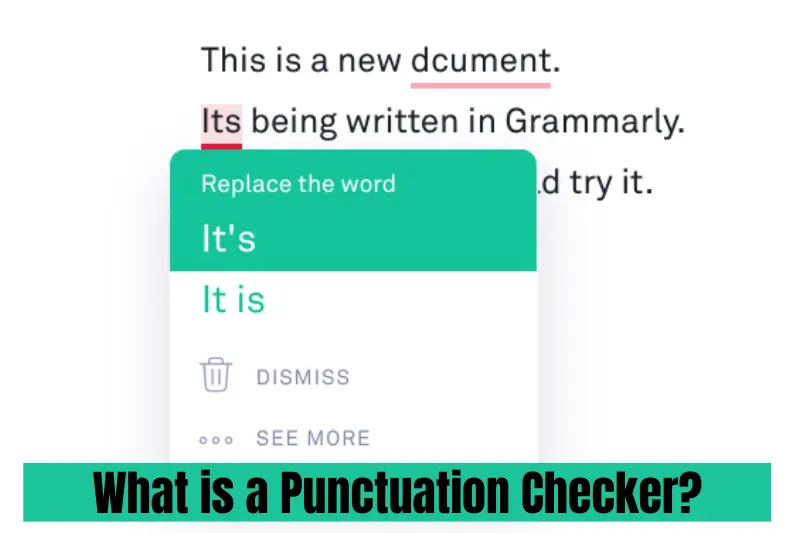
A punctuation checker is a digital writing tool designed to identify and correct punctuation errors in your text. It scans your sentences and highlights issues such as missing commas, incorrect full stops, misplaced apostrophes, or inconsistent sentence structure. The goal is to help writers produce clear, accurate, and polished content without spending extra time manually proofreading every line.
Modern punctuation tools often work as part of a broader grammar checker punctuation system. This means they not only fix punctuation mistakes but also analyze sentence structure, grammar usage, and overall readability. By using advanced language processing technology, these tools can understand context and suggest the most accurate corrections.
In simple terms, a punctuation checker acts like a smart writing assistant. It reviews your content in real time, suggests improvements, and helps ensure that your writing follows proper punctuation rules—making it more professional, readable, and effective for communication.
Why Punctuation Matters in Writing
Punctuation is not just a set of rules—it is what gives meaning, rhythm, and clarity to your writing. Even a small punctuation mistake can completely change the message of a sentence. For example, the difference between “Let’s eat, grandma” and “Let’s eat grandma” shows how important correct punctuation really is.
Good punctuation helps readers understand your ideas smoothly without confusion. It breaks sentences into logical parts, shows pauses, and highlights the structure of your thoughts. Whether you are writing an email, a blog post, or an academic paper, proper punctuation makes your content easier to read and more professional in tone.
This is why tools like a punctuation checker are so valuable. They help ensure your writing is clear and error free by identifying issues such as missing commas, incorrect sentence endings, and inconsistent punctuation usage. In addition, using a punctuation check tool can improve readability and reduce misunderstandings in both formal and informal communication.
When punctuation is used correctly, your writing becomes more trustworthy, engaging, and effective—helping you communicate your message exactly the way you intend.
How a Grammar Checker Improves Punctuation
A grammar checker punctuation tool plays an important role in improving the overall quality of your writing by detecting and correcting punctuation errors automatically. Instead of manually reviewing every sentence, these tools scan your text in seconds and highlight issues such as missing commas, incorrect sentence endings, and improper spacing between punctuation marks.
What makes these tools especially useful is their ability to understand context. For example, a sentence may look correct at first glance, but the tool can detect that a comma is needed to improve clarity or that a full stop is missing to complete the idea. This helps writers avoid common mistakes that often go unnoticed during self-editing.
In addition, a punctuation corrector not only fixes errors but also teaches better writing habits over time. By consistently showing corrections, it helps users understand where they commonly make mistakes and how to improve their punctuation usage in future writing.
Whether you are writing academic assignments, business emails, or blog content, using a punctuation checker as part of a grammar tool ensures your writing is polished, professional, and easy to read.
Common Punctuation Mistakes People Make
Even experienced writers sometimes make small punctuation errors that can affect clarity and readability. These mistakes often happen because we write quickly or focus more on ideas than sentence structure. Understanding these common issues can help improve your writing significantly.
One of the most frequent mistakes is missing or misplaced commas. A comma checker can easily detect where a pause is needed or where a comma has been incorrectly added. For example, long sentences without proper commas can become confusing and difficult to read.
Another common issue is incorrect sentence endings. Many writers forget to use full stops or accidentally join multiple ideas into one long sentence. A punctuation check tool helps identify these problems and ensures each sentence is complete and properly structured.
Overusing punctuation marks is also a common habit. Too many commas or unnecessary exclamation marks can make writing look unprofessional. A punctuation corrector helps balance punctuation usage and keeps the tone natural and readable.
Other mistakes include incorrect apostrophe usage, inconsistent punctuation in lists, and mixing formal and informal styles. By identifying and fixing these issues, a punctuation checker helps improve both clarity and overall writing quality.
Benefits of Using a Punctuation Checker
Using a punctuation checker can significantly improve the quality, clarity, and professionalism of your writing. One of the biggest advantages is that it saves time by quickly identifying errors that would normally take several minutes to find manually. This makes the writing and editing process much more efficient, especially for long documents.
Another key benefit is improved accuracy. A punctuation check tool helps ensure that every comma, full stop, and punctuation mark is placed correctly, reducing the chances of misunderstandings in your writing. This is especially important in academic work, business communication, and online content where clarity matters.
These tools also enhance readability. By fixing punctuation errors and improving sentence structure, a punctuation corrector makes your content easier to read and more engaging for your audience. Clear writing not only communicates your message better but also leaves a stronger impression on readers.
In addition, using a comma checker or grammar tool regularly can help you develop better writing habits over time. As you see corrections and suggestions, you naturally learn how to avoid similar mistakes in the future.
Overall, punctuation tools are not just about fixing errors—they are about improving communication, building confidence in writing, and producing high-quality content every time.
Who Should Use Punctuation Tools?
A punctuation checker is useful for almost anyone who writes, but it is especially helpful for people who want to improve clarity, accuracy, and professionalism in their content.
Students are one of the main groups who benefit from these tools. Whether they are writing essays, assignments, or research papers, a punctuation check helps them avoid small mistakes that can affect grades. It also helps them learn proper writing habits over time.
Bloggers and content writers also rely heavily on a punctuation corrector to make their articles easy to read and SEO friendly. Clean and well structured writing improves user experience, which is important for ranking on search engines and keeping readers engaged.
Business professionals use punctuation tools for emails, reports, and presentations. Proper punctuation ensures clear communication, reduces misunderstandings, and creates a more professional impression in the workplace.
Even non native English speakers benefit greatly from a comma checker and grammar tools. These tools help them write more confidently by fixing punctuation issues and improving sentence structure in real time.
In short, anyone who writes regularly—whether for study, work, or online publishing—can improve their communication by using punctuation tools effectively.
How to Choose the Best Punctuation Checker
Choosing the right punctuation checker is important if you want accurate results and a smooth writing experience. Not all tools offer the same level of quality, so it is essential to focus on a few key factors before selecting one.
First, accuracy matters the most. A good punctuation check tool should correctly identify missing commas, sentence-ending errors, and other punctuation issues without giving unnecessary or incorrect suggestions. The more precise the tool, the more reliable your writing will become.
Ease of use is another important factor. A simple and user-friendly interface allows you to check your content quickly without confusion. Whether you are a student or a professional, the tool should make the editing process fast and effortless.
It is also helpful to choose a tool that combines grammar and punctuation features. A combined grammar checker punctuation system not only fixes punctuation but also improves sentence structure, spelling, and readability in one place.
Real-time suggestions are another valuable feature. A strong punctuation corrector should highlight mistakes as you type, helping you learn and correct errors instantly instead of waiting until the end.
Lastly, consider tools that support learning. The best punctuation checkers do not just correct mistakes—they also help you understand them, improving your writing skills over time and making you a more confident writer.
EEAT Optimization in Writing
When creating high quality content that ranks well on search engines, following EEAT principles—Experience, Expertise, Authoritativeness, and Trustworthiness—is essential. These factors help ensure that your content is not only useful for readers but also reliable in the eyes of search engines like Google.
Experience means showing practical knowledge of the topic. For example, explaining how a punctuation checker improves real writing tasks such as emails, blogs, or academic work demonstrates hands-on understanding rather than just theory.
Expertise involves presenting accurate and well structured information. When discussing tools like a punctuation check or grammar checker punctuation, it is important to explain how they work, what problems they solve, and why they are useful in everyday writing.
Authoritativeness comes from providing clear, consistent, and valuable content that readers can trust. Well organized explanations of tools like a punctuation corrector help build credibility and position the content as a reliable source of information.
Finally, Trustworthiness focuses on honesty and clarity. Content should avoid misleading claims and instead provide realistic benefits of using punctuation tools. When readers trust your content, they are more likely to engage with it and return for more information.
By applying EEAT principles, your writing becomes more professional, user focused, and aligned with modern search engine standards, improving both visibility and long term ranking potential.
Conclusion
In today’s fast paced digital environment, clear and correct writing is more important than ever. Whether you are writing emails, blog posts, academic papers, or business documents, proper punctuation plays a key role in making your message easy to understand and professional.
Using a punctuation checker helps eliminate common writing mistakes such as missing commas, incorrect sentence endings, and inconsistent punctuation. It not only improves accuracy but also enhances readability and ensures your ideas are communicated clearly.
Tools like a punctuation check, comma checker, and punctuation corrector are especially useful for anyone who writes regularly. They save time, improve writing quality, and help build long term writing skills through consistent feedback and corrections.
By integrating these tools into your writing process, you can produce cleaner, more polished, and more impactful content. In the end, good punctuation is not just about grammar rules—it is about effective communication and leaving a strong impression on your readers.
